
P-LAB Viewer
View, compare, and review BIM projects right in your browser—without installing anything.
Design firms are already usingTake a look inside the “P-LAB Viewer”
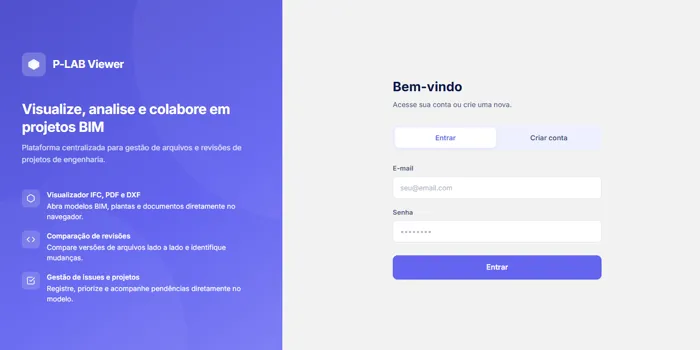
Access via a web browser, with user authentication
Each user has their own access and permissions in a secure environment—and can open PDF and IFC files directly in the browser, without installing anything.
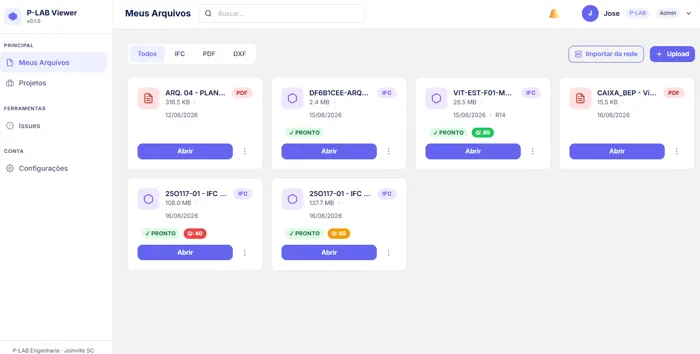
All of the firm's projects in one place
Organize templates, revisions, and pending items by project, with access for the entire team.
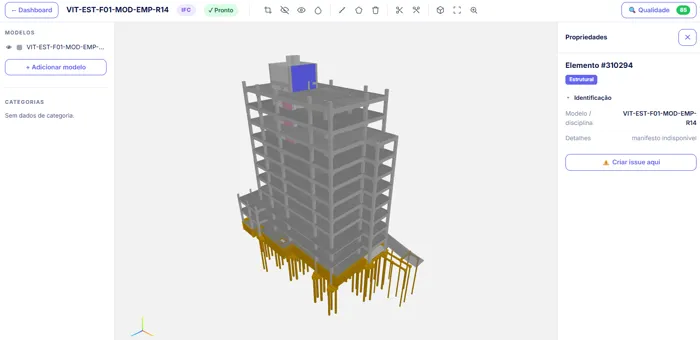
Lightweight, fluid 3D IFC models
Open and browse large templates without any crashes—right from your browser, on any device.
Proofreading Tools in Action
A review of projects the market is already familiar with — now available
Viewing of IFC, PDF, DXF, and DWG files; measurement; clash detection; revision comparison; annotations on models and drawings; issue tracking; and sharing via QR code. Everything a firm needs to review and approve projects, on a Portuguese-language platform designed with the realities of Brazilian designers in mind and at a price that fits within the firm’s budget.
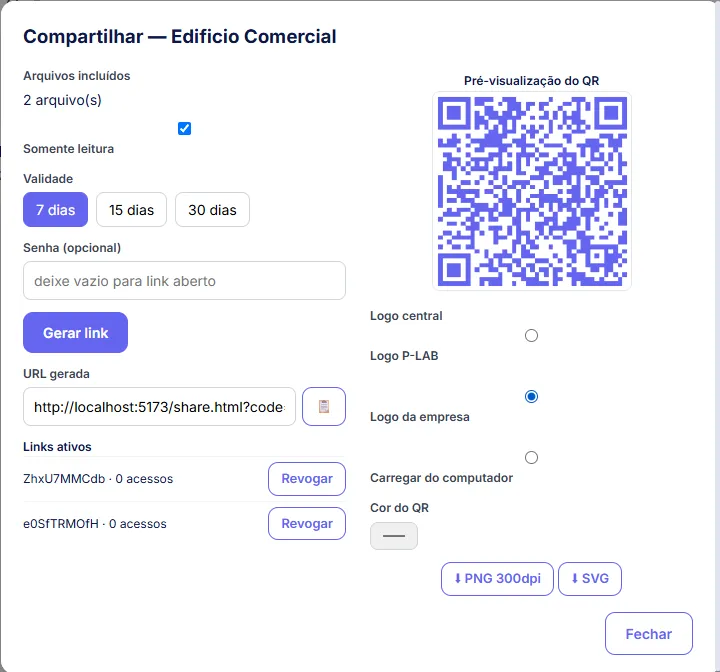
Share via link or QR code
Generate a QR code for the surfboard—the customer scans it and opens the 3D model right on their phone, without having to install anything.
Everything you need to review a project
IFC in 3D in the browser
Open the IFC model without installing anything: cross-sections, dimensions, and properties of each element.
Markups in PDF, DXF, and DWG
Review slides with callouts, arrows, and approval stamps directly in the document.
Comparison of Revisions
IFC models and drawings in PDF, DXF, and DWG formats: each change is marked with a callout and accompanied by a written description of what has changed (dimensions, text, and layers).
IFC Quality Validation
Detects duplicate GUIDs, missing Psets, and georeferencing issues.
Clash detection
Identify conflicts between disciplines: structural × hydraulic × electrical.
Issue Management
Outstanding tasks associated with the template element, with a designated person in charge and a deadline.
Sharing via QR Code
The customer scans the board and views the 3D image on their cell phone, via a link or QR code.
Notifications and Automation
Discord notifications and automatic import of monitored folders.
How It Works
Submit the IFC
Upload the template or let a monitored folder import it automatically.
Check in your browser
Navigate in 3D, compare revisions, run clash detection, and log issues.
Share via QR Code
Generate a link or QR code, and the customer can view the project on their own cell phone.
The Viewer, just the way your office reviews documents
Part of what already exists
We'll start with the "P-LAB Viewer" and tailor the statuses, fields, and pending reports to your team's review process.
Integrated into your workflow
We integrate the Viewer with what your office already uses: folders, spreadsheets, and the report format your client requests.
Scope closed earlier
You approve what will be done and how much it will cost before we get started. No surprises along the way.
A viewer tailored to your office
We start with the existing platform and tailor it to the firm's review process: statuses, fields, reports, and integrations. Finalized in a proposal based on the scope.
In Portuguese, affordable and with no monthly fee in dollars
A BIM review platform designed for the realities of Brazilian architectural firms—quick to implement and with no exchange rate-related costs.
Would you like to see the "P-LAB Viewer" on your model?
Leave your contact information, and we'll show you the Viewer in action with one of your models. Would you rather chat now? WhatsApp is right above.
